
Preschool picture day magic: Photography tips for fun posing, simple props, and stress‑free workflow.
January 30th, 2026
Photo by Kelsey Karaidos Photography
Preschool photography is one of those niches that can feel a little wild at first and then incredibly rewarding once you find your rhythm. The kids are fast, the emotions are big, and no two personalities walk into your setup the same way.
But—that’s also why preschool portraits can become some of the most meaningful images families buy and keep forever.
If you’re new to volume photography or you’re photographing your first preschool picture day, this guide walks through practical preschool photography tips for posing, props, and keeping your day moving. You’ll also find a workflow that helps keep classroom photography organized from shoot to sale without drowning in admin.
Why preschool photography is different (and so rewarding.)
The biggest thing that makes preschool portraits unique isn’t the backdrop or the lighting. It’s the personalities.
One child might hop into your chair and tell you everything about their day, their siblings, and what happened at grandma’s. The next child might freeze up or cry because the camera and a new adult/stranger feel like a lot. Learning how to adapt to each child’s personality can feel tricky at first, but once you start recognizing patterns, it becomes second nature and it is a total game changer.
Preschool pictures matter because this stage matters. Going from age 3 preschool to age 4 preschool (or moving up a grade) is a huge chapter in a child’s life. Parents love documenting it, and schools love offering it. Great preschool portraits also help the school look polished and valuable, and teachers genuinely enjoy seeing the kids’ smiles, cute outfits, and class photos.
When you combine a thoughtful experience with simple, consistent posing and a few high-impact preschool photo ideas, parents tend to feel a real emotional pull. That emotional response often turns into higher orders, more digital sales, and repeat bookings year after year.
Online galleries and a streamlined ordering workflow can keep volume preschool jobs smooth, professional, and profitable without eating up all your evenings. This is one area where Zenfolio can really help.

Understanding your preschool customers: kids, parents, and teachers.
Preschool photography sits right at the intersection of three audiences.
Kids (ages 3–5)
Expect big personality shifts from child to child. Some are chatty, some are shy, some are high-energy, and some are nervous around strangers. A flexible approach helps. Engage the talkers, gently comfort the cautious ones, and turn posing into a game for the wigglers.
Parents
Most parents have the same two thoughts:
- “Will my child smile?”
- “What if they’re shy?”
One of the simplest ways to build trust is to normalize that not every child is ready in the moment and that retakes can be part of a smooth, professional process. If a child is super shy or tears happen, a quick, kind email to parents after picture day can go a long way. Reassurance builds confidence, and confidence sells.
Teachers and directors
Teachers often worry about schedule disruption and classroom management. The more you can take off their plate through clear communication, a quick flow, and minimal interruptions, the more you become the preschool photographer they love working with.
Prior to me arriving at the school, I have the Director provide me with the order of classes for the day. I ask that the Director give teachers an approximate time of when their class will need to be ready for photos (I provide this after looking at the list). Teachers are well aware of their approximate timeframe so disruptions aren’t usually an issue. When it is their time, the Director will usually let the teachers know it’s their turn, and the cute little kiddos get in a line and come on out!

Preschool photography tips for building trust quickly.
Start with a warm, calm introduction.
A “big camera” can be intimidating when kids are used to phones. A simple “Hi. Want to see my camera?” helps. Some kids feel even safer if you briefly show them the back of the camera screen after taking their photo.
Get on their level.
Kneeling so you’re eye-level changes the energy immediately. It feels less intimidating and more like a conversation.
Use simple words and keep it moving.
Clear, short directions help kids succeed quickly:
- “Hands in your lap.”
- “Look right here.”
- “Tiny smile.”
- “Show me how old you are.”
Skip “cheese” if it’s not working.
Sometimes “cheese” gives the most forced expression. I rotate in playful prompts like “cookies” or a quick peek-a-boo moment behind the camera to get a genuine smile.
Preparing for a successful preschool picture day.
Communicating with schools and parents.
One of the biggest stress reducers for everyone is sending a prep flyer or email ahead of time. I create a custom flyer for each school, and directors love it because it is one less task for them.
What I include:
- Picture day date(s), since many schools split by age or class
- A photo of the backdrop so parents can plan outfits
- A quick styling tip such as “Avoid wearing yellow today”
- A simple explanation of how families view and order online
Turnaround matters, too. I aim to get photo gallery links out quickly, often within 4 to 5 days. I also include an order deadline because deadlines encourage timely purchases without needing to chase people.
A note on the Zenfolio QR Code Workflow.
If you’re photographing volume school portraits, Zenfolio’s QR Code Workflow can help you connect each child’s images to the right family quickly. It is designed to help photographers keep each child’s images organized, from pre-shoot prep to photo day and gallery delivery. Get organized for photo day with QR Code Workflow.
Absent or uncooperative children.
Retake day can make this easy. If a child is absent or truly not having it, a calm “we’ll try again on retakes” keeps everyone supported and keeps your picture day moving.

Gear and setup for preschool portraits and preschool photography in small spaces.
I’m a Canon photographer, and my favorite body for this work is the Canon R6 for many reasons!
1. Incredible autofocus for moving kids.
The R6’s autofocus is a game changer for volume preschool work. Face and eye detection locks onto little faces quickly and stays there, even when kids wiggle, turn, or decide to look everywhere except the camera. This means fewer missed shots, fewer soft images, and less time spent reshooting or fixing mistakes later.
2. Fast and reliable in real-world conditions.
Preschool photo setups aren’t always in perfect light. The R6 performs beautifully in mixed or lower light classrooms, which means I can keep my ISO reasonable and still get clean, sharp images. When you’re moving fast and can’t constantly tweak settings, that reliability matters.
3. Speed for catching real expressions.
Great preschool expressions happen in split seconds. The R6’s fast burst shooting lets me capture that in-between laugh, the tiny smile that flashes and disappears, or the moment a shy child finally relaxes. Instead of hoping I caught it, I usually already have it.
4. Lightweight and comfortable for long days.
Picture days are long. You’re on your feet, kneeling, standing, moving, and repeating that hundreds of times. The R6 is light enough that my shoulders and wrists aren’t wrecked by the end of the day, which makes a real difference in how consistent my energy stays.
5. Dual card slots for peace of mind.
When you’re photographing an entire school, there are no do-overs. Dual card slots mean instant backup in-camera, and that peace of mind is priceless on high-volume jobs.
At the end of the day, the best camera for preschool photography is the one that helps you work faster, miss fewer moments, and stress less. For me, that’s the Canon R6 every single time.
For lenses:
- 35mm: great for smaller rooms, tighter spaces, and full-body options
- 50mm: beautiful, warm, close-up look when you have enough room to step back
Lighting-wise, I often lean into natural light for preschool portraits. When natural light isn’t available, an on-camera flash can get you through. If you need a bigger, softer setup, a portable softbox or beauty dish can give you consistency in darker spaces.
Backup plans that help:
- Ask the director about multiple room options ahead of time
- If the first room is too small, communicate early. Schools usually have a backup spot.
- Keep your setup portable so you can pivot quickly

Engaging prop and background setups parents love.
The goal with preschool picture day is to create something that feels a little more special than the standard studio look without slowing your workflow down.
I love designing a fresh seasonal setup each year. Fall is my busiest and my favorite because it’s the perfect time for warmth and texture. Mums, tall grass, hay bales, and colorful leaves photograph beautifully. In spring, I bring bright florals and a cheerful backdrop that feels fresh and light.
Some schools prefer neutral and timeless, like a simple gray backdrop, and that can sell really well. But many schools love having something a little more “wow,” and it can be a big reason they keep inviting you back.
Preschool photography props: keep it simple, not cluttered.
My go-to prop is a small wooden chair. I’ll borrow one from the preschool if possible, or I’ll bring my own. It’s natural, works with most setups, and it instantly feels “preschool.”
I don’t always use alphabet blocks or crayons. My sets are often styled more like portrait art than classroom-themed scenes. Either way, the same rule applies. Props can add personality without distracting from the child.
A helpful tip is to watch what the child naturally wants to do. If a child points to a pumpkin or wants to hold it, letting them do so can create an adorable moment parents love.
Make resets easy.
Props shift all day long. Marking a spot on the floor, even with discreet tape, helps you reset quickly and keep framing consistent.

Volume posing tips for preschool photography: natural smiles, real expressions.
A simple posing plan keeps volume preschool photography fast while still giving parents variety.
Foundation poses
- Seated on a small chair, stool, or crate, with hands in lap if needed.
- Standing with relaxed arms, hands in pockets, or holding a small prop at mid-chest.
- Criss-cross applesauce if your setup supports it.
Preschool posing ideas for shy kids.
- Speak softly and move at their pace.
- Compliment something specific, like a dress or bow tie.
- Try gentle prompts:
- “Show me how old you are”
- Peek-a-boo behind the camera
For high-energy kids
Going with their energy first can help them settle faster. A quick game like “freeze” works almost every time.
Give parents options.
I try to capture one classic yearbook-style image and one personality shot. Even if a kid cries, parents sometimes want that image too because it’s part of their child’s story, and there’s always the option of re-take day if needed.

Keeping the experience positive for kids, teachers, and parents.
Time per child:
Some kids are done in 2 minutes and some need closer to 5. Planning for around 2 minutes per child keeps your schedule realistic.
Small details that elevate your work.
I keep wipes with me and do quick checks. A clean face, neat hair, and outfit adjustments help kids feel confident, and parents appreciate the extra care.
Handling tears and “I don’t want to.”
Tears happen. Letting a friend go first can help. If a child is truly overwhelmed, retakes can be the smoothest answer.
Support teachers by taking communication off their plate.
After picture day, I handle parent questions directly so the school isn’t stuck troubleshooting orders or galleries. All I need from the school is a list of names and emails, if available. My assistant notes the file number next to each name and adds quick comments like “shy at first” or “big smile.”
A small thank-you can also help you get invited back:
- Free staff headshots
- Two complimentary class photos per class
Building parent trust and satisfaction.
Parents are always juggling the never-ending to-do lists. Build trust with a simple gallery delivery and ordering process that doesn’t require a huge part of their day. For the best experience, your gallery will make it easy for parents to:
- Find their child’s images
- Choose their favorite print and digital options
- Place their order quickly from any device
Retakes can be offered if the school chooses, and are a nice option for when children are absent or having a tough day. Sibling photos can be optional depending on the school. Parents like being informed; communicate whether these are available on your flyer to set expectations.
Late orders can still be accepted. I keep a deadline to encourage timely ordering, but I’ll reopen a gallery if a late order comes in.
Turning preschool photo ideas into a profitable, repeatable workflow.
There’s always more than one way to do things. To make volume school photography jobs a sustainable part of your business, you’ll want a workflow that is repeatable, saves you time, and results in happy customers. I’ll walk you through a couple methods; one a basic, standard process I’ve used in the past, and the second a more automated process that will help you scale your business.
From shoot to sale: choosing a simple preschool photography workflow.
Process 1: A basic workflow I’ve used in the past:
- Create a prep flyer for the school to send to parents.
- Photograph each child and teacher on picture day.
- Edit
- Upload to Zenfolio organized by school and class using folders on your computer.
- Create each student’s password-protected gallery.
- Email parents their link and password with ordering instructions.
- Parents receive a link to the class gallery.
- They scroll to find their child, using first name and last initial.
- They enter a unique password.
- They can order prints or digital downloads from any device.
Zenfolio helps here because each child can have a private, organized viewing experience, and parents can order easily without paper forms or school delivery logistics.
Process 2: A workflow created with automations that simplify the process for both photographers and parents:
- Create a prep flyer for the school to send to parents.
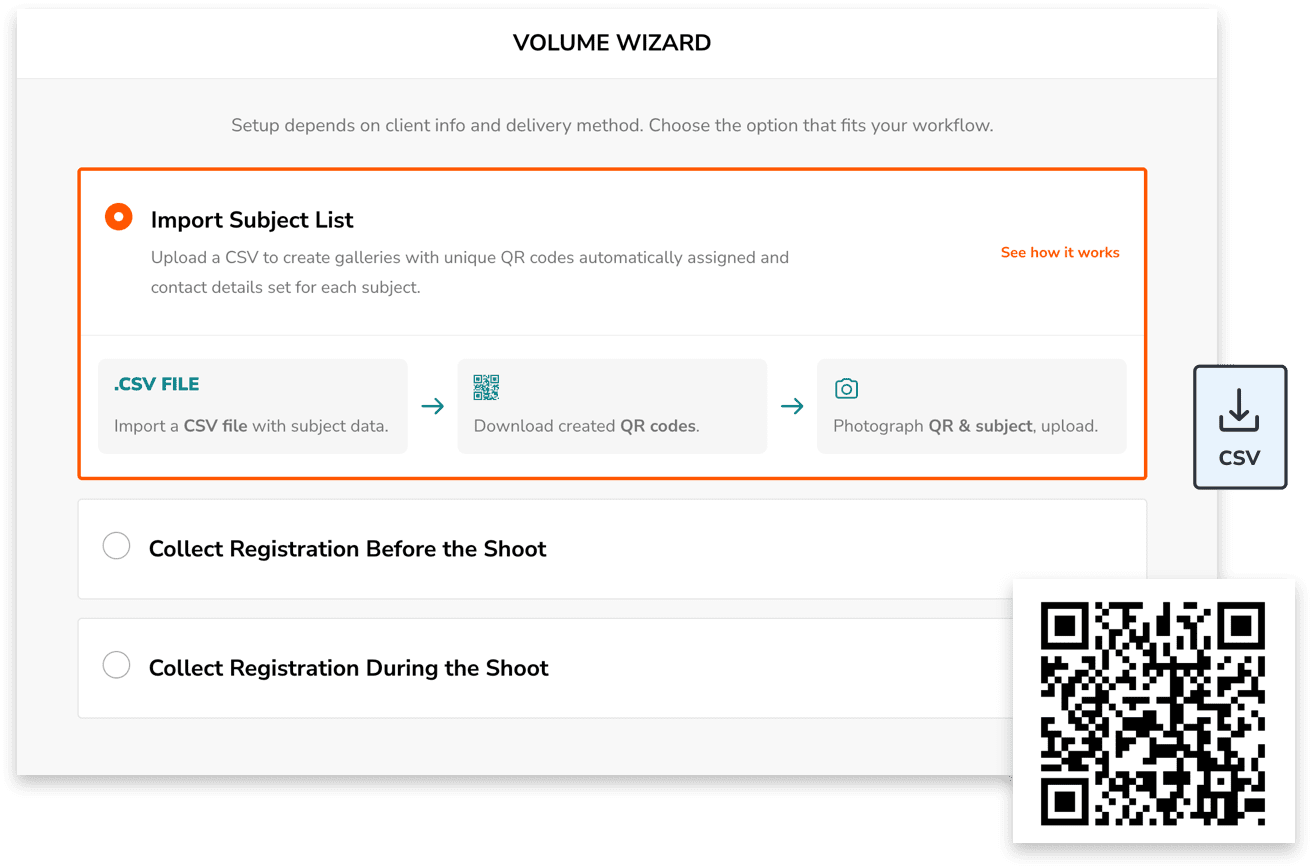
- Use the Volume Wizard in Zenfolio and follow the QR code workflow.
- You upload the pre-school’s roster, provided by the school’s administrator.
- Zenfolio’s tool will create galleries for all students within minutes.
- You export or print QR Codes to use on Picture Day
- Photograph or scan the QR code for each child and teacher before taking the photo on picture day.
- Edit
- Upload to Zenfolio, including the QR code images you took.
- Photos are immediately sorted in the child’s galleries; photos with QR codes are automatically hidden from client view.
- With one click send a Bulk Email to all parents, which will link directly to their child’s gallery–no scrolling or searching needed.
- They can view, order prints or digital downloads from any device.
Zenfolio helps here by quickly creating these private galleries upfront, then organizing all the photos you upload into the galleries after the shoot. If anything doesn’t quite match, it’s flagged for you to review and correct. Parents love the experience (less searching = less time and frustrations) and photographers get hours of their time back with all the gallery creation and sorting tasks completed for them.
Read next: Organizing your school photography workflow for success.

Smart packages, pricing, and upsell ideas for preschool jobs.
One of my biggest sales tips is simple; Take extra photos and give parents variety. I provide 5–7 individual images for each student, giving parents options…and they love it.
More variety increases the chance they’ll fall in love with more than one, which is where digital packages really take off.
What sells best:
- “All Digital Images” is my top seller
- I offer print packages that range from about $36 to $90, with a strong performer around the $50 range.
Class photos are a separate purchase, often as an 8×10. I create these as composites, and every student is photographed whether they pre-order or not. For sibling photos, I place the sibling image in the youngest child’s gallery so each child still has their own individual gallery for portraits.
Popular upsells:
- Sibling bundles
- Class photo add-ons
- Seasonal designs or small gifts for grandparents
Zenfolio’s selling tools, like Smart Upsell, can help increase average order value without adding extra admin. You can enable it in your preschool photography price list, then customize it to automatically notify clients about any of the following discounts while they shop and add items to their cart:
- Currency amount needed to receive free shipping
- Currency amount needed for a tiered discount (dollars or percentage)
- Quantity of products needed in their cart to get a percentage off their total order.
How Zenfolio supports preschool photographers.
Online ordering through Zenfolio saves an incredible amount of time. There are no paper forms, no sorting prints by hand, and no school delivery logistics. Parents order when it’s convenient, and orders ship directly to their door.
It’s easier for parents, easier for photographers, and easier for schools. It also frees up my time for more shoots, more personal time, or both.
Learn how Zenfolio helps preschool photographers manage picture day from shoot to sale.

Final thoughts: build a system, then let the kids be kids.
Preschool photography will probably never be completely calm, and honestly, that’s part of the magic. But when you walk in with a simple plan, a consistent setup, and a workflow that’s already thought through, the day becomes fun instead of frantic.
The real secret to successful preschool picture days isn’t having the perfect prop or the trendiest backdrop. It’s creating an experience that feels safe and easy for the kids, organized and respectful for the teachers, and reassuring and professional for the parents. When all three of those groups feel taken care of, everything else: sales, re-bookings, and word-of-mouth referrals–tends to follow naturally.
If you focus on:
- Simple, repeatable posing
- A clean, flexible setup
- Fast, friendly communication
- And a streamlined system from shoot to sale
…you’ll not only survive preschool picture day, you’ll build a niche that’s profitable, sustainable, and genuinely meaningful.
These photos matter. For parents, they’re freezing a fleeting season of childhood. For schools, they’re part of their story. And for you, they can become one of the most rewarding and reliable parts of your business.
Build a solid system, trust your process, and then leave room for the giggles, the wiggles, and the beautifully imperfect moments in between. That’s where the real magic (and the best-selling images) live.
See how Zenfolio handles school & volume photo day—from roster to delivery.
Spend less time building galleries and answering parent emails—and more time shooting. Zenfolio helps you prep, organize, deliver, and sell school portraits at scale.


